
Sending a Text Message
To send a text message (SMS) broadcast to residents using Onsite, follow these steps:
CREATING THE SMS
- Navigate to the Broadcasts section in the sidebar
- Click Add to create a new broadcast.
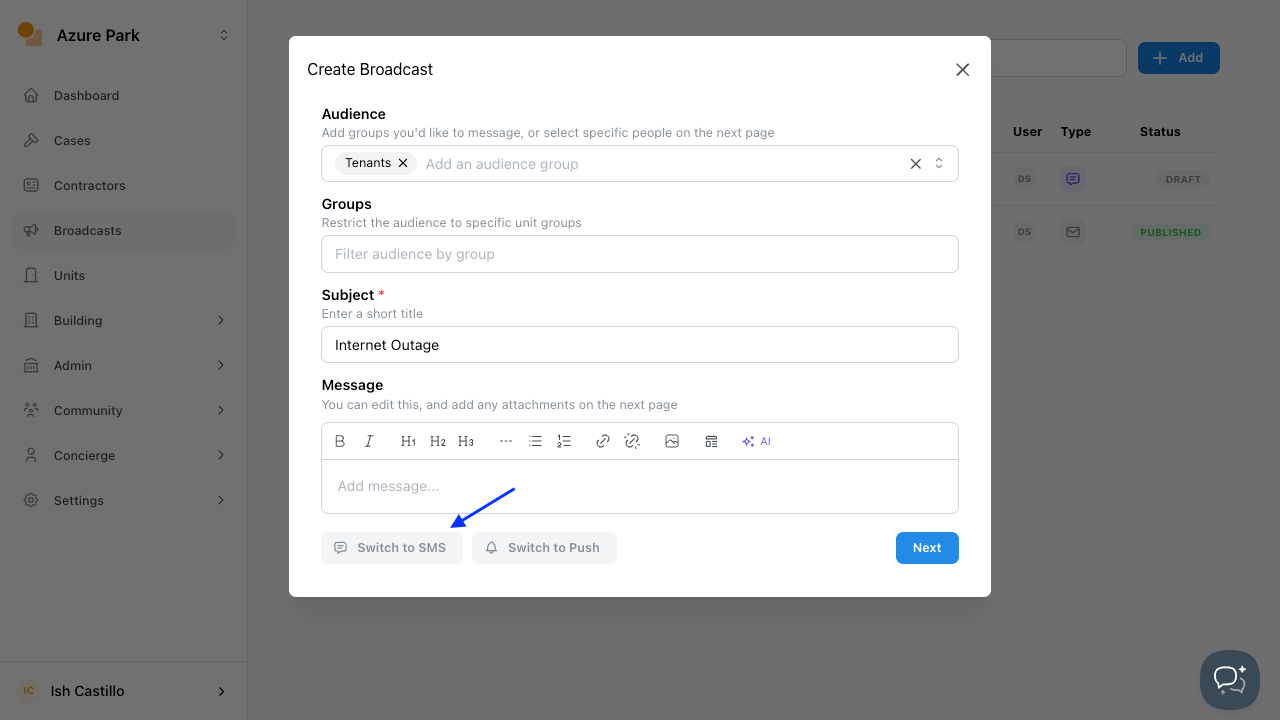
- Under Audience, configure where the message will be sent.
- Enter a short title in the Subject field.
- Select Switch to SMS at the bottom of the dialog box.
-
Click Next.
SENDING THE SMS
- Add the Message to be sent through SMS.
- Add or remove recipients as needed.
- If updates were added, click Save.
- Click Send to Recipient/s.
IMPORTANT NOTE:
ENSURE SUFFICIENT SMS CREDITS
- Navigate to Settings, then select Billing.
- Check Add Ons to ensure there are enough SMS credits
- Top up if needed (See Topping Up SMS Credit for guidelines)
